
Quick answer: Google added temporary threads to AI Mode on November 17, 2026. A temporary thread is not saved to search history, ignores past preferences and is gone when closed. My take: businesses can no longer treat AI visibility as something a history or report will show, so they should check AI answers on a schedule and judge results by patient calls.
Key takeaways
- Temporary threads are an AI Mode option that Google announced on November 17, 2026, rolling out globally on desktop and mobile browsers.
- Google says a temporary thread is detached from your account, so its responses are not informed by past preferences and do not affect future personalization.
- Practice owners and agencies are both affected, because 1 kind of AI Mode search now leaves no history behind.
- Google Search Console reports AI Mode inside the “Web” search type, and I found no Google documentation of a separate report for temporary threads.
- My opinion: temporary threads make scheduled checks of AI answers and patient calls the only honest way to track AI visibility.
- I would do 4 things now: write for follow-up questions, complete the Google Business Profile, check AI answers monthly and track patient calls.
What are temporary threads in Google AI Mode?
Temporary threads are a Google AI Mode option that starts a chat which is not saved to your history and does not use your past preferences. A searcher clicks the temporary threads icon in the upper right corner of AI Mode, asks questions as usual and switches back to a normal thread when finished.
AI Mode is Google’s chat-style search experience, where a searcher reads a written AI answer with links and asks follow-up questions. In Google’s announcement, the company says the session is detached from the account, so the responses are not informed by past preferences, do not affect future personalization and are not saved to the search history. Google adds that once the thread is closed, it is gone. No settings change is needed to use it.
What changed when Google added temporary threads to AI Mode?
Google changed temporary threads in AI Mode from a reported test into an announced rollout on November 17, 2026. Google’s announcement says the option is rolling out globally on desktop and mobile browsers, in all languages AI Mode supports.
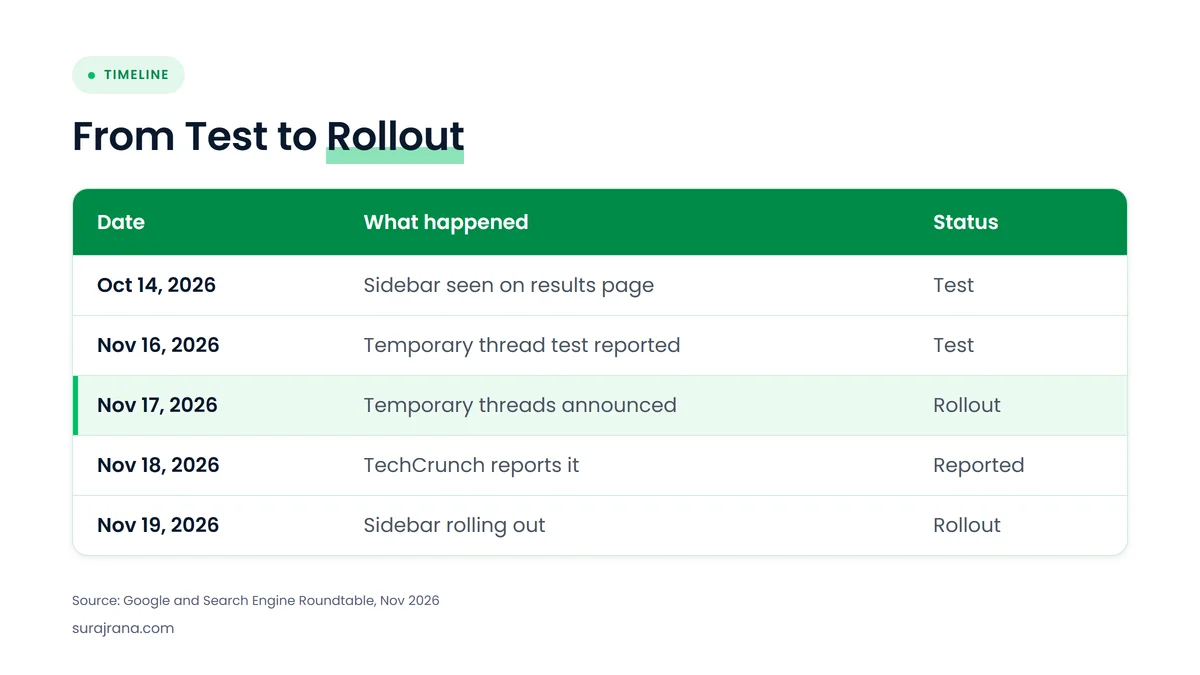
The 5 dated steps around the rollout are listed in the table below.
| Date | What happened | Status | Source |
|---|---|---|---|
| Oct 14, 2026 | AI Mode left sidebar reported on the main results page | Test | Search Engine Roundtable |
| Nov 16, 2026 | Google reported to be testing a temporary thread option in AI Mode | Test | Search Engine Roundtable |
| Nov 17, 2026 | Temporary threads announced, rolling out globally | Rollout | |
| Nov 18, 2026 | TechCrunch reports temporary threads as an incognito-style option for AI Mode | Reported | TechCrunch |
| Nov 19, 2026 | Collapsible sidebar of recent AI searches rolling out | Rollout | Search Engine Roundtable |
The table shows Google adding a way to keep AI Mode searches and a way to hide them within 3 days of each other, which tells me Google wants searchers to use AI Mode in both modes.
The Search Engine Roundtable recap from November 16, 2026 notes that the Gemini app has offered a temporary chat for over a year, and TechCrunch compares the new AI Mode option to it. Neither report states how long Google keeps temporary thread data, and Google’s announcement does not either, so I won’t guess.
Who is affected by AI Mode temporary threads?
Anyone who earns customers from Google Search is affected by AI Mode temporary threads, but practice owners and agency owners feel it differently. The owner gets fewer clues about what patients asked, and the agency gets fewer places to find proof.
What do temporary threads mean for dental practice owners?
Temporary threads mean dental practice owners can expect some patients to research privately in AI Mode, with no trace in their own history. A patient asking about implant costs or a nervous-patient dentist may prefer a chat that nothing saves, and your practice cannot see that chat either way.
That makes the basics carry more weight. Clear dental SEO work on service pages, a complete Google Business Profile and honest answers to patient questions are what an AI answer can pull from, whether the thread is saved or not.
What do temporary threads mean for agency owners?
Temporary threads mean agency owners should stop presenting one AI Mode screenshot as proof of visibility. A temporary thread starts without past preferences, so it can show a different answer than the one your client sees in a saved account.
I made the same argument about rankings in why I stopped selling keyword rankings to clients. A single position was never the result, and a single AI answer is even less of one.
Can you measure temporary threads in Google Search Console?
No, you cannot measure temporary threads as their own line in Google Search Console. Google Search Central says AI Mode traffic is reported in the Performance report within the “Web” search type, and I found no Google documentation of a separate report for temporary threads.
The same Google Search Central page says there are no additional requirements to appear in AI Overviews or AI Mode, beyond being indexed and eligible to show in Search with a snippet. Google’s announcement does not say whether clicks from a temporary thread are counted differently, so I would not assume anything either way. The reporting also has history: I wrote about whether you can trust Search Console AI visibility reporting after Google’s November logging bug.
Why do I think temporary threads change how we track AI visibility?
I think temporary threads change AI visibility tracking because they remove the assumption that an AI answer is a fixed thing you can look up. A saved thread can use past preferences, and a temporary thread cannot, so the same question can return different AI answers for the same person.
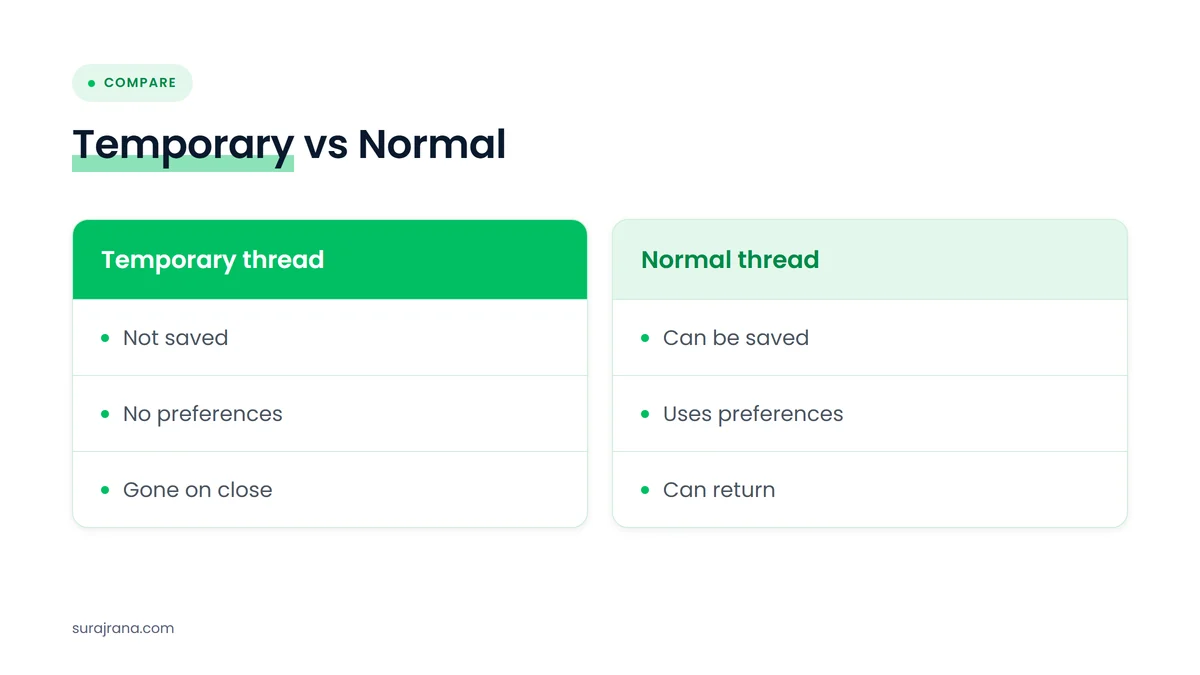
The differences Google describes between the 2 thread types are listed in the table below.
| Attribute | Normal thread | Temporary thread |
|---|---|---|
| Saved to search history | Can be saved, and can appear in the new sidebar | No, per Google |
| Informed by past preferences | Can be | No, per Google |
| Affects future personalization | Can | No, per Google |
| After you close it | Stays available to return to | Gone, per Google |
The table shows that a temporary thread works like a clean slate, and my opinion is that the clean slate is the useful one for a business checking its own visibility.
Because Google says temporary threads are not saved to history, I expect they will not appear in the new sidebar, but that is my inference and Google has not confirmed it. If you want to see how an AI answer treats your practice with no personal history behind it, a temporary thread is a fair test. It is also the opposite direction from Google pushing AI Mode users to turn on Personal Intelligence, so I expect searchers to be split between a personalized AI Mode and a private one.
What should you do now about AI Mode temporary threads?
You should do 4 things now about AI Mode temporary threads, and none of them needs a new tool. They keep your practice easy for an AI answer to understand and keep your tracking tied to real patients.
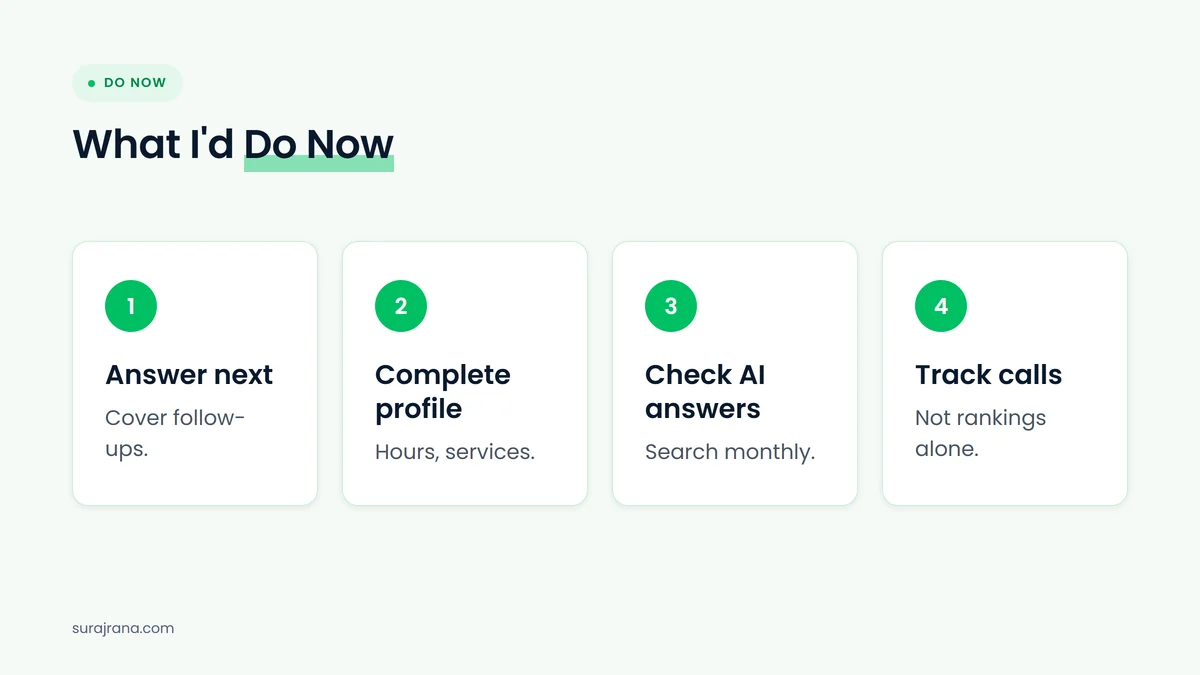
The 4 actions are listed below in the order I would do them.
- Write for follow-up questions on each service page, covering cost, candidacy, recovery and alternatives, so one page can answer a whole conversation.
- Complete your Google Business Profile, including services, hours and the phone number, as covered in my Google Business Profile guide for dentists.
- Check AI answers monthly by asking AI Mode your top patient questions in a normal thread and a temporary thread, then record whether your practice is named or linked.
- Track patient calls and bookings by source, so a change in how people search shows up in the numbers that pay the bills.
Temporary threads and the AI Mode sidebar fit together as 2 sides of one memory feature. The sidebar, which began rolling out on November 19, 2026, lists recent AI searches so people can return to them, and temporary threads let people search without leaving a record.
The sidebar is the subject of a separate post, where I explain why Google rolled out an AI Mode sidebar and what it does to the idea of a single search. The Search Engine Roundtable report dated November 19, 2026 is my source for the sidebar rollout. Taken together, I read the 2 launches as Google making AI Mode a place people stay in.
Frequently asked questions
Are AI Mode temporary threads live for everyone?
No, AI Mode temporary threads may not be live for everyone yet. Google’s announcement of November 17, 2026 says they are rolling out globally on desktop and mobile browsers, and a rollout normally reaches people in stages, so you may not see the icon yet.
Do temporary threads change how Google ranks my site?
No, nothing Google or the reports say suggests temporary threads change rankings. They change whether a chat is saved and personalized. What they may change is how well your own history, or a client’s, predicts what other people see.
Does a temporary thread hide my practice from AI answers?
No, a temporary thread does not hide a practice from AI answers, based on what Google has said. Google describes it as a session without past preferences and without saved history, not as a different index, so your service pages and profile can still be used.
Should a dental practice build a separate strategy for temporary threads?
No, a dental practice should not build a separate strategy for temporary threads. Complete service pages, a complete Google Business Profile and clear answers to patient questions work in classic results and in AI answers alike.
Where do I land on temporary threads?
I think temporary threads are a small button with a large measurement problem: 1 kind of AI Mode conversation that matters to a practice will leave no history, and no report will count it separately. Practices that answer the follow-up questions and agencies that measure patient calls instead of single answers will not need that history.
I’m Suraj Rana, and this is the lens I use when I review a practice’s visibility through my dental SEO services. If you want a team to handle it, Dental Master Media builds the service pages and local profile work behind dental SEO for practices, and you can contact me to talk it through.
Want to know how AI Mode describes your practice?
I’m Suraj Rana, founder of Dental Master Media. If you are not sure what AI answers say about your practice, or how to track it now that some searches leave no history, I’m happy to look at it with you and tell you what I’d check first.
Sources
- Google, “Temporary threads are now available in AI Mode in Search”, November 17, 2026. https://blog.google/products-and-platforms/products/search/temporary-threads-ai-mode/
- TechCrunch, “Google’s AI feature in Search gets its own incognito mode”, November 18, 2026. https://techcrunch.com/2026/11/18/googles-ai-feature-in-search-gets-its-own-incognito-mode/
- Search Engine Roundtable, “Search Engine Roundtable Recap, November 16, 2026”, November 16, 2026. https://seroundtable.com/recap-11-16-2026-42541.html
- Search Engine Roundtable, “Google Search Officially Rolls Out Collapsible Sidebar”, November 19, 2026. https://www.seroundtable.com/google-search-rolls-out-ai-mode-sidebar-42580.html
- Search Engine Roundtable, “Google Tests AI Mode Left Sidebar On Main Google Search Results Page”, October 14, 2026 (updated October 30, 2026). https://www.seroundtable.com/google-ai-mode-left-sidebar-42298.html
- Google Search Central, “AI features and your website”, accessed November 25, 2026. https://developers.google.com/search/docs/appearance/ai-features

My name is Suraj Rana, and I am a seasoned Dental SEO Expert with extensive experience in the Dental SEO industry. Leveraging my deep knowledge and expertise, I help dental practices enhance their online visibility and attract more patients.